
Download 1Checker – Free Grammar Checker for Mac, Windows, iOS & Android
Overview
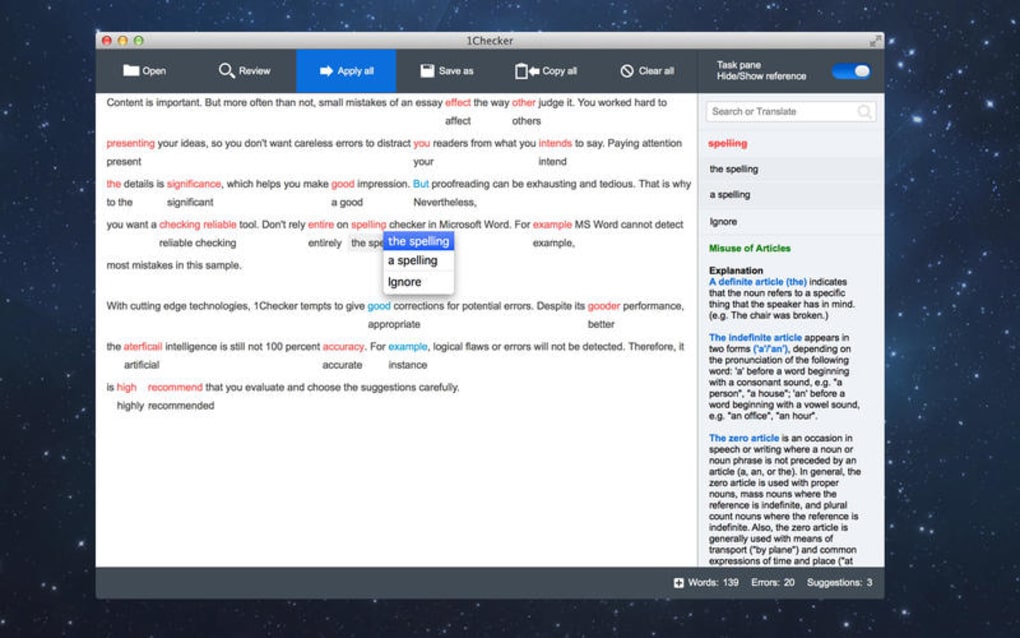
1Checker is a free, lightweight proofreading application designed to help writers, students, and professionals perfect their English texts across multiple platforms. Built with a clean, distraction‑free interface, the app lets you open a document or paste any piece of text, then instantly highlights spelling mistakes, grammar glitches, style inconsistencies, and even offers richer vocabulary alternatives. Beyond basic correction, 1Checker bundles a built‑in dictionary, a thesaurus‑style vocabulary enhancer, and a translation tool that supports quick look‑ups in several languages.
The latest update resolves the long‑standing “Open and Save” bug, ensuring that files are imported and exported without data loss. Whether you’re drafting a business report on macOS, polishing a blog post on Windows, or tweaking a quick note on iOS, 1Checker provides a secure, offline‑first environment that respects your privacy while delivering real‑time suggestions. Its algorithm draws from contemporary linguistic research, making it suitable for both native speakers and ESL learners who need reliable feedback without the cost of premium services.
In short, 1Checker is a versatile, free tool that consolidates multiple writing aids into a single, easy‑to‑use package.
Key Features
- Spell Check: Detects misspelled words across a wide dictionary, including proper nouns and technical terms.
- Grammar Checker: Highlights subject‑verb agreement errors, misplaced modifiers, and punctuation issues.
- Style Reviewer: Suggests improvements for conciseness, passive voice reduction, and overall readability.
- Vocabulary Enrichment: Acts as a built‑in thesaurus, offering synonyms and context‑appropriate alternatives.
- Dictionary & Translation: Provides instant definitions and translation snippets for over 30 languages.
- One‑Click Corrections: Apply all suggested changes with a single click, or selectively accept individual edits.
- File Compatibility: Supports .txt, .docx, .rtf, and plain text formats, with seamless import/export.
- Cross‑Platform Support: Available for macOS, Windows, iOS, and Android, ensuring consistent performance on desktop and mobile.
- Offline Operation: All core functionalities work without an internet connection, protecting user privacy.
- Recent Bug Fixes: The “Open and Save” issue has been resolved, guaranteeing stable file handling.
Each feature is engineered to work in harmony, providing a comprehensive proofreading experience without the need for multiple separate apps. For instance, while the spell checker flags obvious typos, the style reviewer simultaneously evaluates sentence flow, allowing users to improve both accuracy and elegance in a single pass. The integrated translation tool further expands the app’s utility for multilingual writers, making 1Checker a true all‑in‑one writing companion.
Installation, Usage & Compatibility
Getting started with 1Checker is straightforward. For macOS and Windows users, simply visit the official website, click the “Download for Mac” or “Download for Windows” button, and run the installer. The process follows standard OS conventions—drag the app to the Applications folder on macOS or follow the guided setup on Windows.
Mobile users can locate 1Checker in the Apple App Store or Google Play Store, where the app is listed as a free download. After installation, launch the program and you’ll be greeted by a minimalistic dashboard featuring an “Open File” button and a large text‑input area. To proofread a document, either drag‑and‑drop the file into the window or paste your text directly.
Once the content is loaded, click “Check Now” and 1Checker will scan the text within seconds.
The app automatically detects the operating system and applies the appropriate language model, ensuring optimal performance on each platform. It supports macOS 10.12 and later, Windows 7 onward, iOS 13+, and Android 8+. For users who need to work across devices, 1Checker offers cloud‑sync (optional) via a free account, allowing you to save corrected documents and retrieve them on any supported device. The user interface adapts to screen size, providing a responsive layout on tablets and smartphones while retaining the full feature set.
Because 1Checker is built on native code for each OS, it runs efficiently without draining battery life on mobile devices or consuming excessive RAM on desktops. Regular updates are delivered automatically through each platform’s store, guaranteeing that you always have the latest language database and bug fixes. Security‑conscious users will appreciate that the app does not collect personal data unless you enable cloud sync, and all processing occurs locally unless you opt for the optional online translation service.
Pros, Cons, FAQ & Conclusion
Pros
- Completely free with no hidden subscriptions.
- All‑in‑one tool eliminates the need for separate spell‑check, grammar, and thesaurus apps.
- Offline functionality safeguards privacy and works without internet.
- Cross‑platform availability ensures consistency across Mac, Windows, iOS, and Android.
- Simple one‑click correction saves time for bulk edits.
Cons
- Advanced style suggestions are limited compared to premium competitors.
- No built‑in plagiarism detector.
- Translation feature relies on third‑party APIs, which may have occasional latency.
- Interface, while clean, lacks extensive customization options.
Frequently Asked Questions
Is 1Checker really free?
Yes, 1Checker is offered as a free download with all core features available at no cost. Optional cloud sync is also free, and there are no hidden subscription fees.
Can I use 1Checker on my iPhone?
Absolutely. 1Checker is available in the Apple App Store and works on iOS 13 or later, providing the same proofreading capabilities as the desktop versions.
Does the app store my data?
All processing happens locally on your device. Data is only stored in the cloud if you enable the optional sync feature, and even then it is encrypted.
What file formats does 1Checker support?
The app can open and save .txt, .docx, .rtf, and plain text files, making it compatible with most word processors.
How often is the language database updated?
Language updates are rolled out automatically through the app stores. Typically, major updates are released every quarter, with minor dictionary refinements in between.
Conclusion & Call to Action
Overall, 1Checker stands out as a robust, free solution for anyone looking to improve the quality of their English writing without juggling multiple subscriptions. Its seamless integration of spell checking, grammar analysis, style advice, and vocabulary enrichment makes it a valuable companion for students, professionals, and casual writers alike. While it may not offer the deep stylistic insights of premium platforms, its offline security, cross‑device compatibility, and zero‑cost model more than compensate for those minor gaps. If you’re searching for a reliable proofreading tool that respects your privacy and works wherever you are, 1Checker is worth a download today. Click the button below to get the free version for your operating system and start polishing your text instantly.
Review Summary: 1Checker delivers a comprehensive set of proofreading tools for free, with strong cross‑platform support and an intuitive interface. Minor limitations in advanced style suggestions are outweighed by its privacy‑first design and zero cost.







